Space Play · R Replay · N Next · 1–8 Choose · F Full Screen · S Settings · T Timer
Clef
Starting Note
Chord Type
Interval Range
Direction
Session Length
Playback
Difficulty
Display
💡
⏱ Challenge
Pick the sub-mode and timer duration, then press Start. Answer as many questions as you can before the timer runs out.
⏱ Challenge2:000 correct ·
0 answered
Find: —🎤 Starting mic…Tip: click any note to hear its pitch
🎤 Starting mic…Tip: click any note to hear its pitch
Choose the Interval
Click "Play Interval" to begin. Listen, then choose the interval below or sing the 2nd note.
0
Correct
0
Total
0%
Accuracy
0/20
Notes
⠿⏱ Timer
05:00
Custom
:
🎼 All Generated Notes
How to Use
1. Configure the interval range, direction, and clef in the ⚙ Settings panel (open it with the ⚙ Settings button, top-left).
2. Listen. The app plays the 1st note then the 2nd. Click Replay to hear it again.
3. Identify the interval by clicking the matching button (2nd, 3rd, 4th, etc.).
4. Continue. Correct answers auto-advance. Wrong answers show the correct answer and wait for you to click Next Note.
5. When the session ends you'll get a per-interval breakdown and an option to Review your mistakes.
Tips: Set session length and auto-play in the ⚙ Settings panel (top-left).
Keyboard shortcuts:Space Play · R Replay · N Next · 1–8 Pick interval · F Full Screen · S Settings · T Timer.
🦸
Good morning,
Ready to sharpen your eye today?
👋
What should we call you?
Quick one-time thing — we'll use it to greet you on the home screen from now on.
👋
Welcome to Interval Hero!
Interval Hero trains your eyes to read intervals at a glance, so sight-reading stops feeling like decoding one note at a time.
New here? Start with 🎮 Game Mode — it walks you through every skill in short, easy-first levels, so you always know what to try next.
Finish the free levels and you'll unlock your rank, starting at 🌱 Interval Rookie — keep practicing to climb toward 🎼 Interval Adept, and unlock the rest of Game Mode to go all the way to 👑 Interval Maestro.
Take your time — mistakes are part of how this trains your eye, not a setback.
🎉
Nice work!
That's your free trial session. Create a free account to keep training, save your progress, and unlock every mode — Chain, Guide Notes, Chord Inversions, Game Mode, and more.
You've hit today's practice limit on a free account. Come back tomorrow for more, or ask your teacher to upgrade your account for unlimited daily practice.
🏆
Time for a Checkpoint!
You've made real progress — this is a quick check-in to see where you stand. It's not a test you can fail, and nothing changes if you'd rather wait.
What it covers
🎵
Guide Notes
Naming notes on the staff
🎹
Chord Inversions
Reading the shape at a glance
🎧
Play the Note
Mic-checked as you play
40 questions · 15 minutes · one attempt
🎯
Nothing new to learn here
Where you learned it
🎵
How will you play the notes?
You'll play each note on your instrument and the app confirms it. Choose your input:
📘 Interval Hero Guide
Game Mode now walks you through each skill step by step as you play. This is the quick visual reference to come back to any time.
About This App
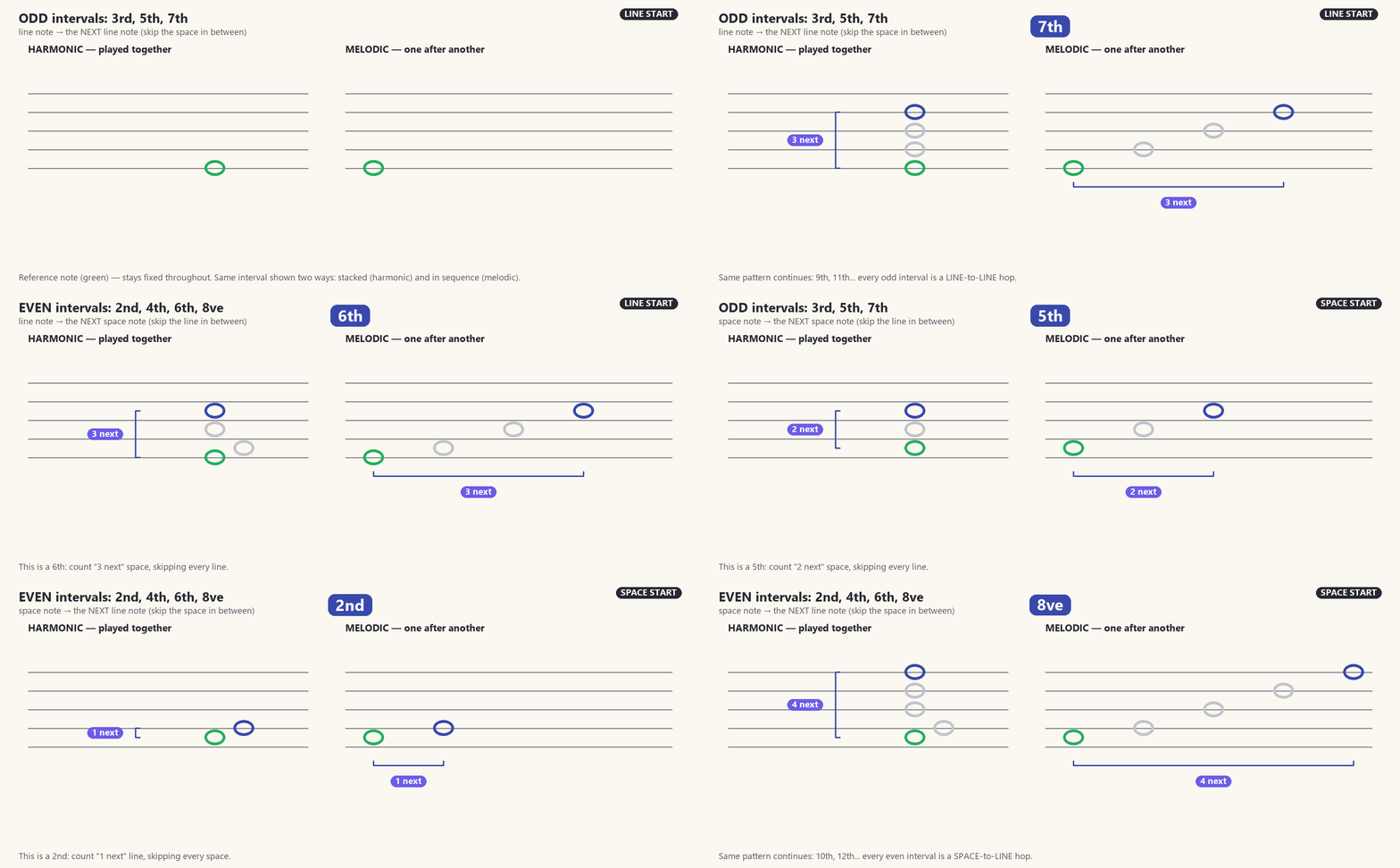
This app focuses on pitch reading — the pattern and movement of notes — not rhythm, and not interval quality (no minor 2nds, augmented 5ths, etc). We believe strong note reading doesn't need accidentals. The core trick: intervals are either odd (3rd, 5th, 7th) — line-to-line or space-to-space — or even (2nd, 4th, 6th, 8ve) — line-to-space or space-to-line. See it in action below.
The Odd / Even Trick in Motion
Odd intervals stay line-to-line or space-to-space; even ones cross line-to-space.
Recommended Way to Use This App
Start with 5-Note Range — everything stays in one hand position, so it's the fastest way to build speed. Try both Melodic and Harmonic Intervals, then test yourself in Challenge mode.
Move to Chain — same skills, just a wider range. Challenge mode again once it feels easy.
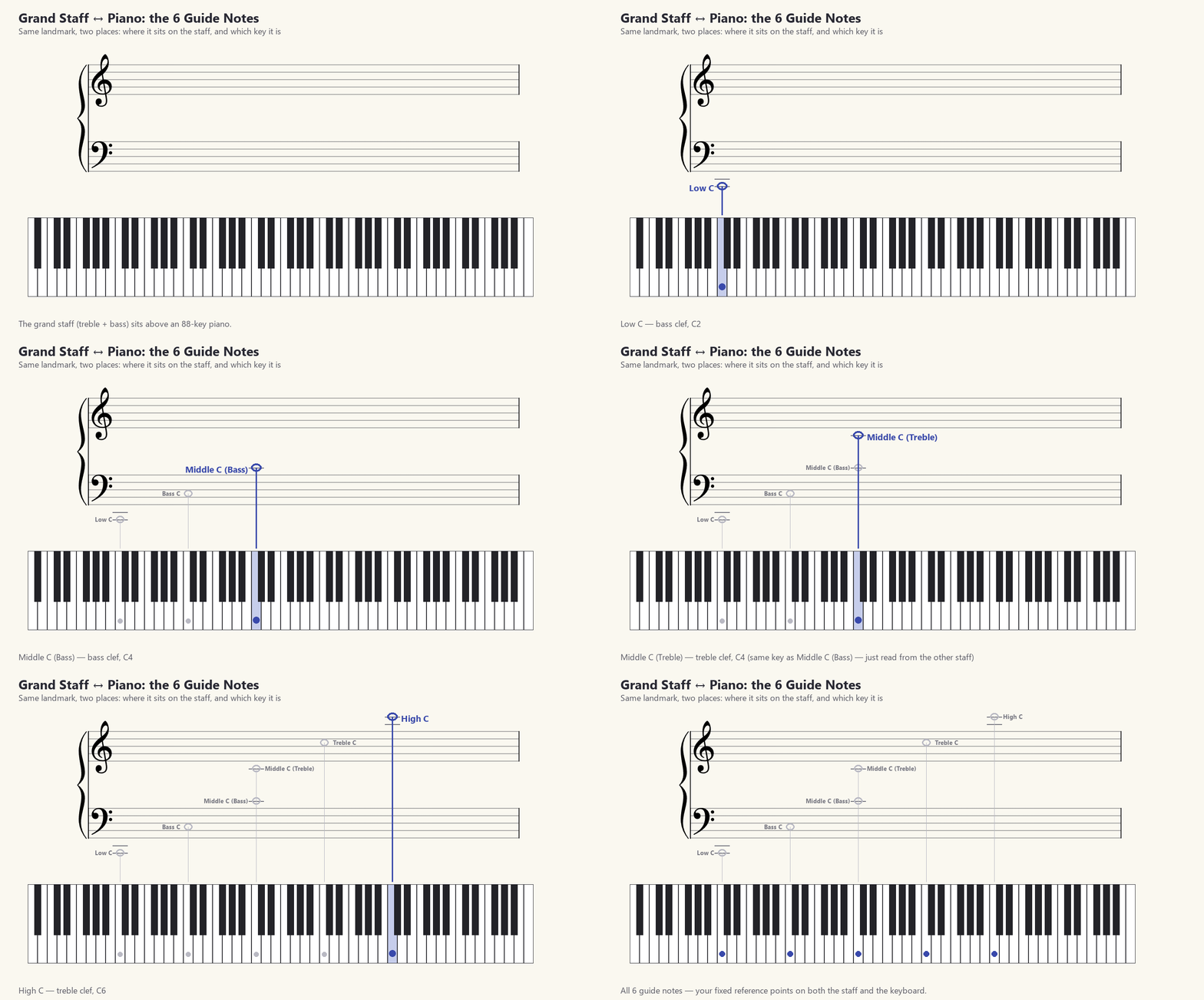
Learn the Guide Notes (GIF below) — lock in the six landmark C's, on both the staff and the keyboard.
Do a 5-Note Range Challenge, then hit Full Screen — play through every note on your instrument at your own pace, racing the clock.
Test yourself in real time with Play the Note — read each interval and play it immediately; the mic checks every note as you go.
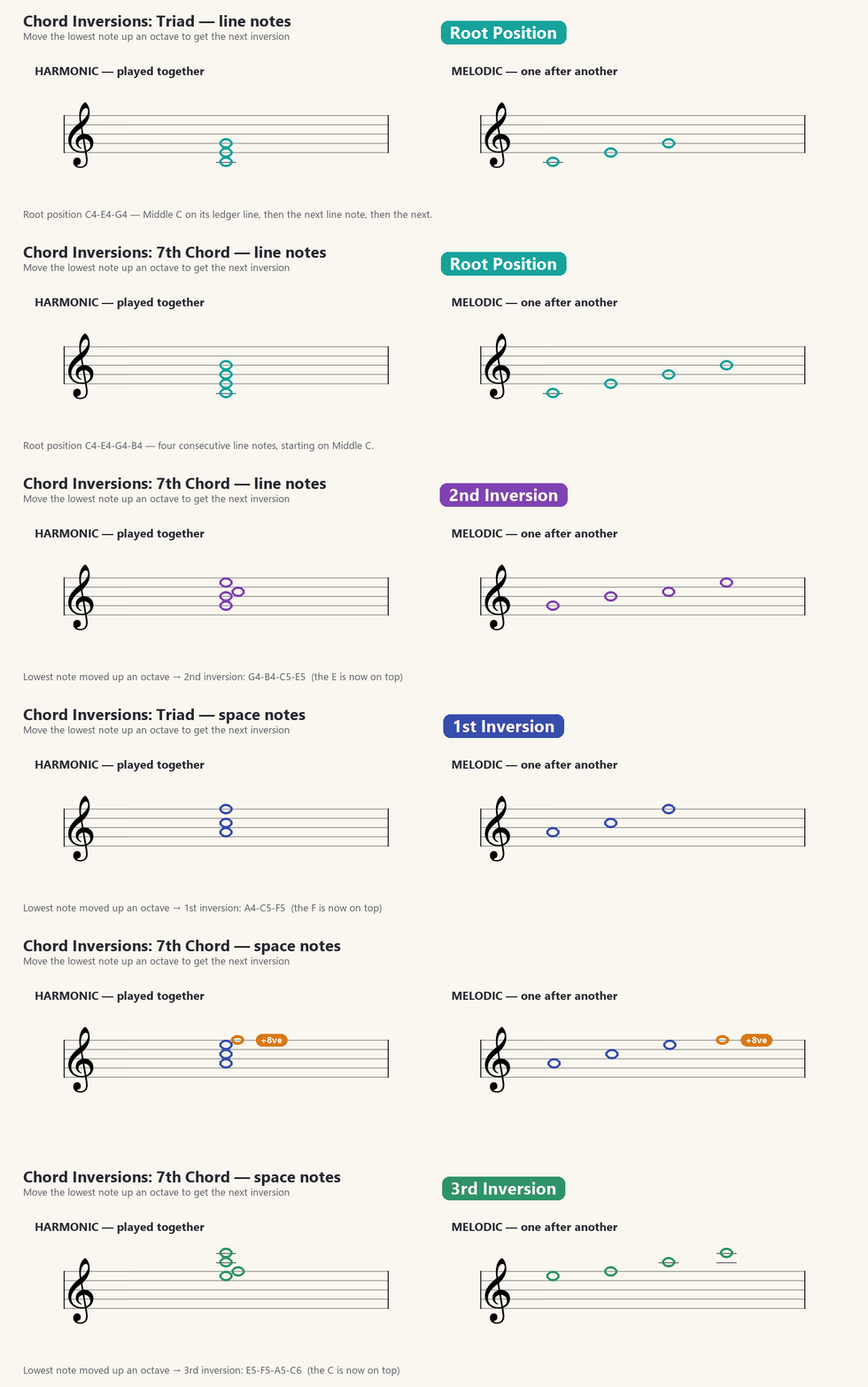
Finish with Chord Inversions — recognize the shape, not the notes. See the GIF below for exactly how the pattern works, for triads and 7ths.
Guide Notes: Landmarks on the Staff & Piano
The six landmark C's, mapped from the grand staff to the matching piano key.
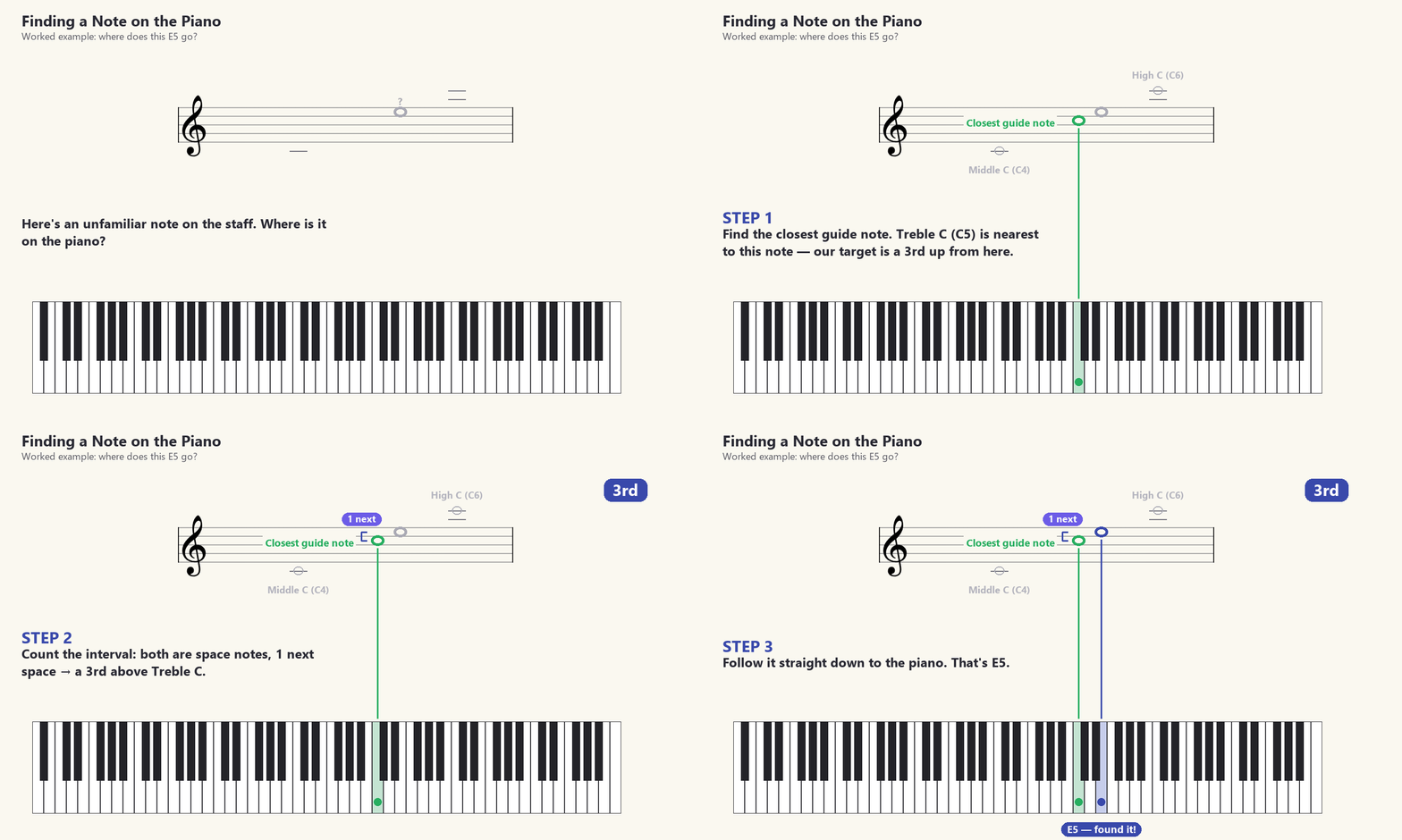
Finding Any Note From a Guide Note
Worked example: (1) find the closest guide note to the note you're reading, (2) count the interval between them, (3) follow it straight down to the key.
Chord Inversions
To invert, lift the lowest note up an octave (orange). Repeat and the chord cycles back to root, just higher — shown for a triad and a 7th.
📊 My Progress
🎮 Game Mode
Work through six levels, in order — each one unlocks the next once you pass it. This is a guided path through the same modes above; nothing here is locked away from the regular tabs.
📋 Assignments
Practice focuses your teacher sent you. Starting one sets up the tabs above automatically — just play through it like normal.